Badger Garbage Disposal Not Working? Reset, Jam and Power Fixes
Badger disposals (Badger 1, Badger 5, Badger 5XP and Badger 1HP) are InSinkErator’s entry range. InSinkErator describes them as having “galvanized steel grind components” and “Heavy Duty Dura-Drive induction motors with jam-busting torque.” They share InSinkErator’s reset button, bottom wrench socket and support line, so if you’ve read an InSinkErator guide, the same fixes work here.
⚠️ Power off, hands out
Switch the disposal off and unplug it (or turn off its breaker) before you reach under the sink or into the drain. InSinkErator: “Do not place your hand in the garbage disposal at any time.” Use tongs or pliers. If the house breaker trips the moment the Badger starts, stop: that’s an electrical fault for an electrician, not a reset problem.
Badger garbage disposal not working: match what you see
| What you notice | Most likely cause | Next step |
|---|---|---|
| Completely silent | Overload tripped, breaker or GFCI off, unplugged | Reset button, then power |
| Hums but doesn’t spin | Jammed turntable | Free the jam |
| Runs a few seconds, then stops | Overheating and tripping the overload | Let it cool, check for a jam |
| Runs but the sink fills up | Clog in the drain line or trap | Drain check |
| Dishwasher won’t drain after a new Badger | Knockout plug still in the inlet | Dishwasher inlet |
| Water dripping from the unit | Loose connection or a failing body | Leaks |
Which Badger do you have?
The model is on the label on the side of the disposal. InSinkErator currently lists four Badger models:
| Model | Motor |
|---|---|
| Badger 1 | 1/3 HP |
| Badger 5 | 1/2 HP |
| Badger 5XP | 3/4 HP |
| Badger 1HP | 1 HP |
The troubleshooting is the same for all of them. The model matters for the warranty and if you end up replacing it.
Silent? Press the reset button
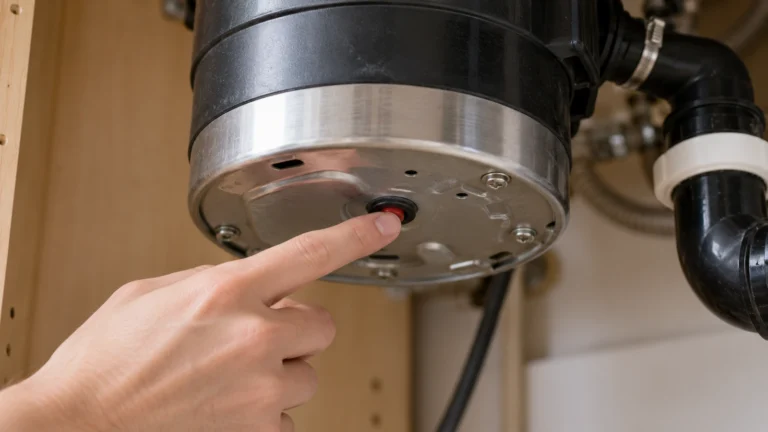
The overload protector cuts power when the motor jams, overheats or runs too long. InSinkErator: it’s “under the sink, on the bottom of the garbage disposal, facing the floor. It is a small square red button.” When tripped, “you will see the red button dropped down about a quarter of an inch (5mm).”
- Turn the disposal switch off.
- Press the red button in gently. If it won’t stay in, InSinkErator says to “wait ten minutes and try again.”
- Run cold water and switch it on.
If the button keeps popping out, read what to do when the reset button won’t work.
Still silent? Check the breaker and outlet
- Breaker or fuse. InSinkErator: “switch the breaker off then on, or replace the fuse.” Press Reset on any GFCI outlet in the kitchen too.
- Lamp test (if your Badger plugs in under the sink). Unplug it, plug in a lamp turned on, and flip the disposal switch on and off. If the lamp follows the switch, the power is fine and InSinkErator says “your garbage disposal requires service.” If it doesn’t, the outlet or switch needs an electrician.
- Hard-wired Badger. After the breaker, InSinkErator says the problem “may be in the garbage disposal, or in the electrical system.” Leave the wiring to an electrician.
Humming? Free the jam
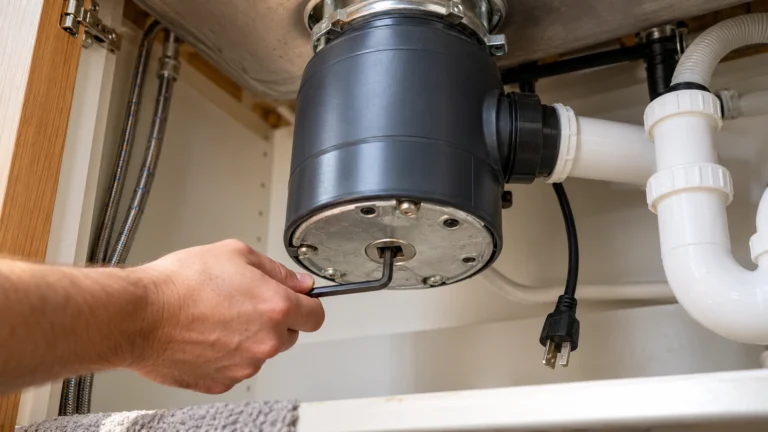
InSinkErator ships its disposals with a self-service wrench, a small silver crank. If it’s lost, “you can use a standard 1/4-inch Allen wrench.” With the power off:
- Find the hole “at the bottom of the garbage disposal, dead center, facing the floor.”
- Insert the wrench and “work the wrench back and forth in both directions.” If it’s stiff, “it is OK to use some force. The wrench is designed to bend before any damage is done.”
- Keep going until it “turns freely in complete circles in both directions.”
- Look in with a flashlight, especially around the edge of the shredding disk, and remove anything you see with tongs or pliers.
- Press the reset button, run cold water and switch on. If it jams again, repeat.
Lost the wrench and don’t have a hex key? InSinkErator sells a replacement Jam-Buster wrench. Our humming disposal guide covers what to do if it hums with no jam.
Runs, but the sink won’t drain
If the Badger spins normally but water stands in the sink, the blockage is usually past the disposal, in the trap or drain line. Don’t pour caustic drain cleaner into the disposal; disposal makers such as Moen warn against it. A plumber can clear the trap and drain line. InSinkErator says never to pour grease or fat into the disposal or drain, which is a common cause of these clogs.
Dishwasher won’t drain after installing a Badger?
New disposals come with a plastic knockout plug sealing the dishwasher inlet. If the dishwasher stopped draining right after the Badger was fitted, the plug is probably still in. Removing it means disconnecting the dishwasher hose, so most people have the installer or a plumber do it. See our dishwasher not draining guide.
Leaking from the disposal
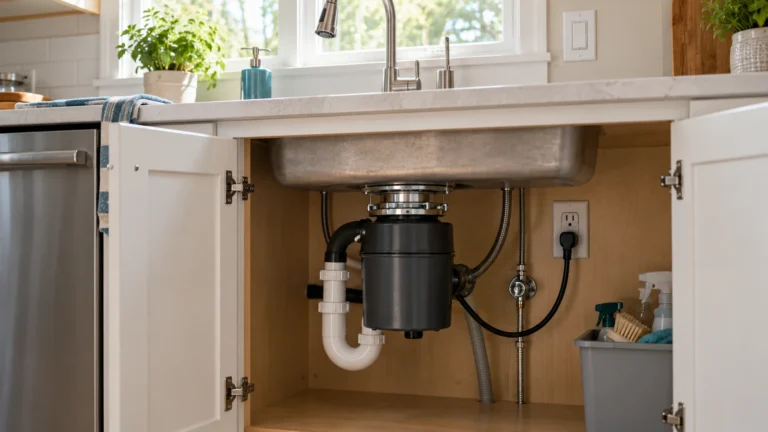
Find where the water starts with the cabinet dry and a flashlight: at the sink flange (top), where the dishwasher hose joins, at the drain pipe joint, or from the body of the disposal. Hose and pipe joints can often be tightened or resealed. A leak from the body of the unit itself usually means it needs replacing. Check the warranty before paying for a new one.
Warranty and support
InSinkErator handles Badger warranty and support. Warranty length depends on the model; for example, InSinkErator backs the Badger 5 with a “5-Year We Come to You In-Home Limited Warranty.” Check your model’s warranty on InSinkErator’s site, and have the model and date of purchase ready. InSinkErator also offers text support at 262-233-2231.
If it’s out of warranty, HomeAdvisor puts an installed disposal replacement at $200 to $625, and Fixr puts fixing a jammed disposal at about $75 to $150.
Frequently asked questions
Where is the reset button on a Badger garbage disposal?
On the bottom of the unit, facing the floor. It’s a small square red button that drops down about a quarter inch when it trips. Switch the disposal off and press it in gently.
Why is my Badger disposal humming but not working?
It’s jammed. With the power off, work a 1/4-inch hex key (or the wrench that came with it) in the center hole on the bottom until it turns freely, remove the object with tongs, then press the reset button.
Is Badger made by InSinkErator?
Yes. Badger is InSinkErator’s Badger Series, so InSinkErator’s troubleshooting, parts and warranty support apply.
What size Allen wrench fits a Badger disposal?
A standard 1/4-inch Allen wrench, according to InSinkErator, if you don’t have the wrench that came with it.
My Badger won’t turn on after a reset. What now?
Check the breaker and any GFCI, then do the lamp test at the outlet. If the outlet and switch work, InSinkErator says the disposal needs service.
Sources: InSinkErator: Badger Series · InSinkErator: Badger models · InSinkErator: Badger 5 · InSinkErator: fixing a jammed disposal · InSinkErator: won’t turn on or off · InSinkErator: how to reset a disposal · HomeAdvisor: replacement cost · Fixr: repair cost.
Updated October 28, 2026. Written and edited by Jordan Hale. Steps checked against InSinkErator support and product pages; no hands-on test is claimed. Follow your Badger owner’s manual.